
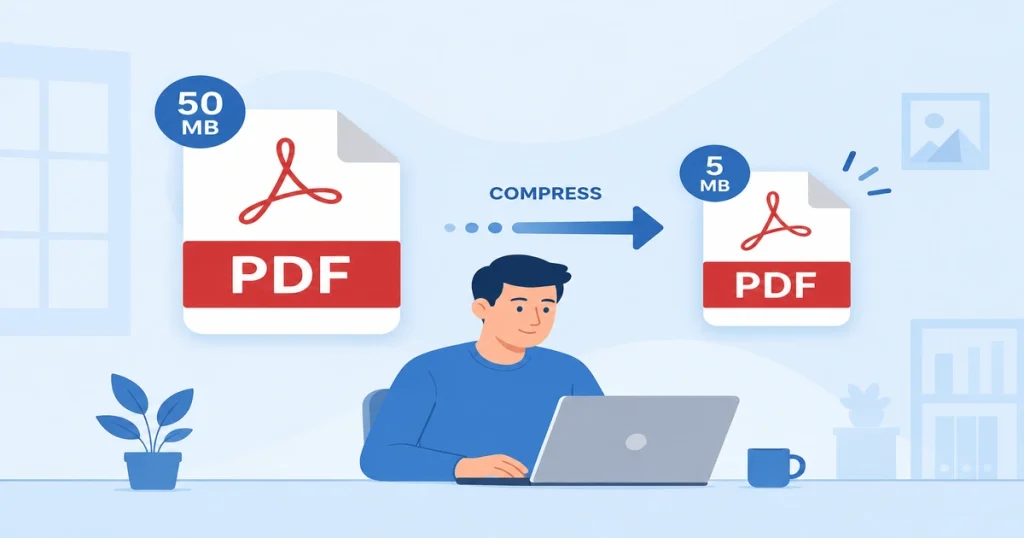
PDF files are one of the best document formats because they preserve formatting across different devices and operating systems. But Large PDF files are slower to upload and may exceed the file size limits of email, job portals, or cloud storage services. You do not need any technical skills to solve this problem. You need to compress PDF files to reduce the file size.
To compress a PDF file online, you can use a browser-based PDF compressor tool. Just open any browser on your device, search for PDF compressor, upload your large file, select the compression level ( high, low, or medium), compress, and then just download your file.
In this guide, you will learn about PDF compression, what it is, how it works, and the best way to compress your PDF files online without losing quality.
What Does PDF Compression Mean?
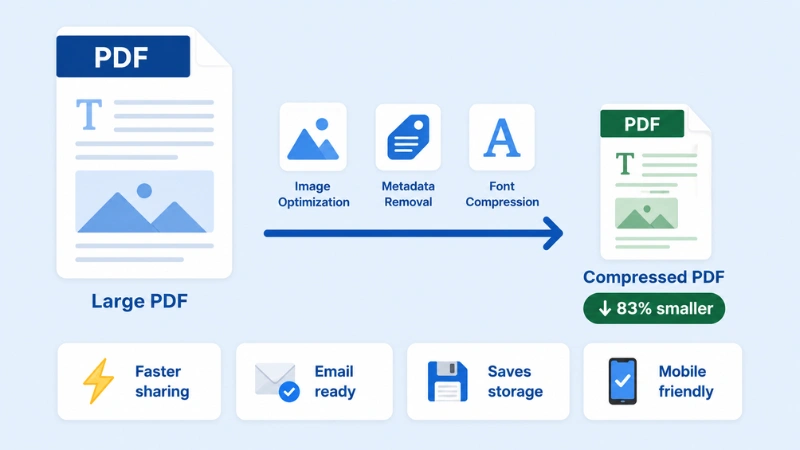
PDF compression means reducing a large PDF document to a small file size without changing its visual quality, which is easy to share. It compresses your file without removing pages or deleting any important information. A PDF compressor optimizes the file by reducing unnecessary metadata. The goal is to create a smaller PDF that remains clear, readable, and easy to share.
Depending on the document, compression may include:
- Optimizing embedded images
- Removing unnecessary metadata
- Compressing fonts
- Eliminating duplicate objects
- Reorganizing file structure for better efficiency
Why Should You Compress PDF Files?
Compressing PDF files has so many benefits, while large PDF files cause many problems. Compressing can save storage space, smaller files help improve your workflow, make easy sharing, and reduce waiting times. If you need another format after compression:
- Convert your optimized PDF to Word for editing.
- Convert PDF to JPG for sharing as images.
- Convert PDF to PNG for higher-quality graphics.
- Convert PDF to PowerPoint for presentations.
Here are some of the biggest advantages.
Faster File Sharing
Compressing files helps to share your documents much faster online, email, messaging apps, or the cloud. Large PDFs take more time to upload and download; compression makes it faster.
Meet File Size Limits
Many websites have limits for uploading file size, and email providers like Gmail and Outlook do not support attachments over 25MB. Compressing your PDFs helps you reduce your file size, which helps your upload to be accepted without any errors, whether you are submitting a resume or uploading university assignments.
Save Storage Space
You can save significant storage on your computer, smartphone, or cloud account by compressing hundreds of large PDF files. It helps free up your valuable space while keeping your files organized.
Easier Mobile Access
Large PDF files take a long time to load on smartphones and tablets, especially when using slow internet connections. Compressed small files load faster, download quickly, and provide a smoother reading experience on mobile devices.
How to Compress a PDF File Online Step by Step
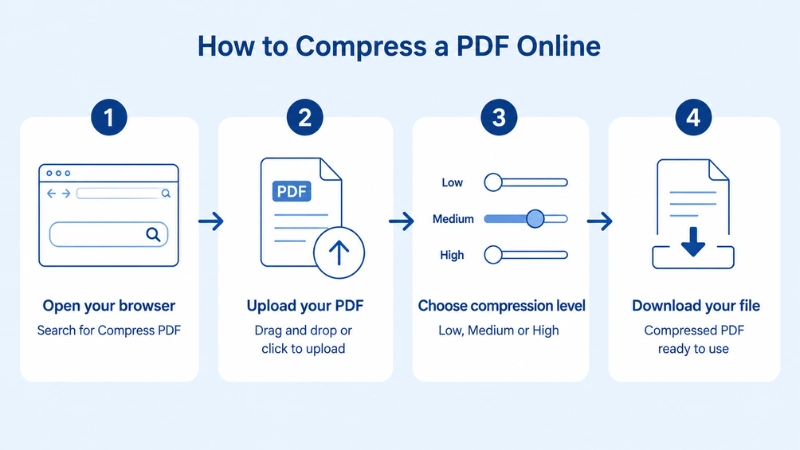
You can compress PDF documents by using a different PDF converter tool, but for a faster compressor, use a browser-based tool. It allows you to compress your file without downloading software or creating an account.
Step 1 — Open Your Browser
Open your preferred browser and search for Compress PDF, then go to the compressor tool. This process runs in the browser, so no need to install software, and it works on any device, such as Windows, Mac, Android, or iPhone.
Step 2 — Upload Your PDF File
Click the upload button or drag and drop the file you want to compress. Most tools support files up to several hundred megabytes, so even large documents are fine.
Step 3 — Choose Your Compression Level
Most tools provide the option to choose a compression level; choose your desired level, and convert.
- Low compression — maximum quality, modest file reduction
- Medium compression — solid balance between size and clarity
- High compression — smallest possible file, slight quality trade-off
Step 4 — Download
Click Download, and get your compressed PDF file ready to use.
Does Compressing a PDF Reduce Quality?
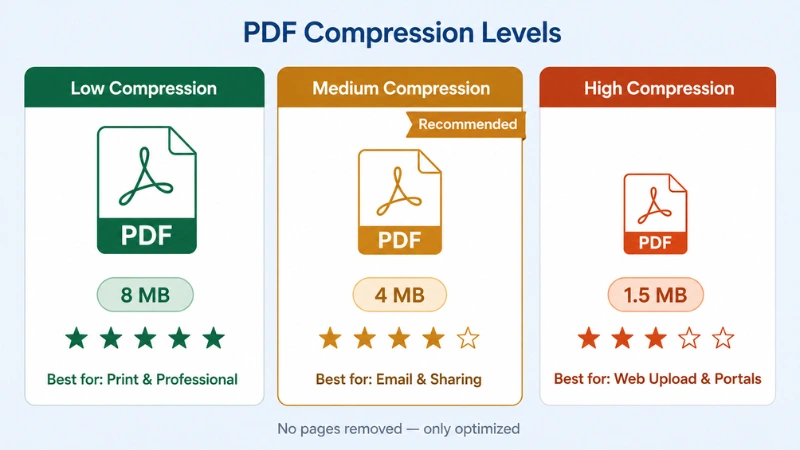
Quality is what we’re all worried about when it comes to compressing a PDF document to a smaller size. A lot of us are afraid that if we cut down the file size, the text is going to start to blur, and the pictures will become pixelated. The truth is, though, how much impact it has on quality depends on how high or low you go with the compression level and what’s actually in the PDF.
Text-based documents like resumes, reports, and contracts are usually totally unaffected by the compression process – the text stays nice and clear, and the file size gets smaller.
On the other hand, if your PDF is full of high-quality images, scanned-in stuff, or graphics, then you might see a bit of a drop in image quality if you choose high-level compression. However, modern PDF compressors use smart tech to really squeeze the best possible image out of your file without losing too much detail.
If you want the best quality for both text and image, pick a medium compression level. That’s usually about the right balance between getting the file size down and keeping the document looking its best. If image quality is your No. 1 priority, then go for a lower compression level, and you should be able to keep things looking nice and sharp.
In short, a good PDF compressor will be able to knock down the file size without a problem while keeping it looking professional and clear.
Final thought
A large PDF file can turn even the simplest task into a headache. Your email bounces back, the uploading takes longer, and your storage fills up faster than it should. You should not have to deal with that.
Once you know how compression works and which level to pick, the whole thing becomes effortless. Your file gets smaller, but it still looks exactly the way it should be: clean, readable, and professional. It does not matter if you are sending a work report, submitting college work, or just trying to keep your files organized. Compressed PDFs just make life a little less complicated.
The next time you have a large PDF file that slows you down, skip the frustration. Open your browser, upload your file, choose your compression level, and download a lighter version in seconds.
If you also need to convert, merge, split, or edit your PDF files, check out pdfconveter, all your PDF tools in one place.
Frequently Asked Questions
Can I compress a PDF on my phone?
Yes, you can use Browser-based tools to work on any mobile browser without needing an app.
Is it safe to compress PDFs online?
It depends on the tool. Look for compressor tools that use HTTPS encryption for file transfers and that delete your files from their servers automatically after processing.
How much can I reduce a PDF’s file size?
It depends on what’s in the file. If your PDFs contain lots of high-resolution images, they can shrink by 60–80%. Documents with heavy text and few or no images compress by a smaller margin, sometimes 10–30%.
What’s the ideal PDF size for email attachments?
For Google and Outlook, an email attachment under 10MB is a safe rule. For most business documents, you can compress to well under 5MB without any visible quality loss.
Does PDF compression remove pages?
No. Compression reduces file size by optimizing the document. It doesn’t delete pages or remove your content.
